Agents that learn from you, plus three months of upgrades
Your agents now learn from you. Every edit, every correction and every preference compounds into how the next piece of work gets done. That is the thread through this update.
These are the iterative improvements. The big announcements come in the next changelogs.
Agents that learn you
The biggest part is the writing system: your style guides and creative brief learn from how you edit. And every conversation keeps working after you leave it.
Edits become learnings - Rewrite a paragraph, cut a phrase, change a claim, and RankUp proposes the pattern as a learning for your style guide. Accept it once and every future article follows it.
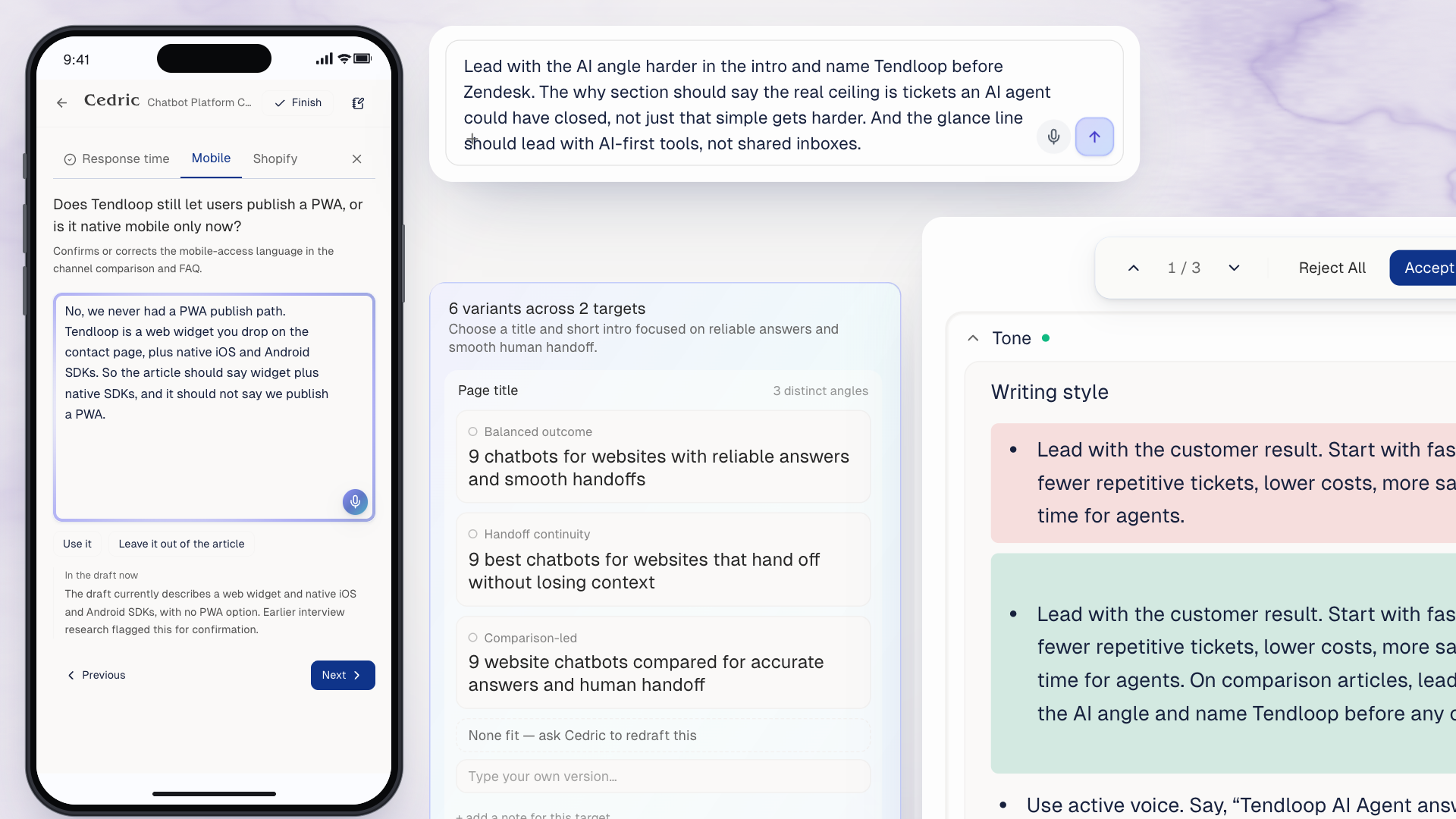
What you tell the writer sticks - Tell Cedric "stop opening sections with a question" and it lands as a learning too, not just as a fix in that one thread.
Your creative brief learns as well - Corrections to facts, positioning or messaging get proposed into the creative brief, so the next article starts from the corrected version.
Chats keep working after you leave - Every conversation with Magnus, Cedric, Lyra and Nova gets a quiet second pass in the background. RankUp picks up the facts, rules and preferences you already said and writes them into brand context and knowledge, so the next session starts already briefed. Like the team dreaming on what you just told them.
You approve each one - Learnings arrive as cards in Settings → Brand Learning. Accept or reject, nothing changes behind your back.
On every workspace - This ran on two workspaces before. It runs on all of them now.
The correction you make in week one does not need making again in week six.
And every agent, not just the writer, keeps your preferences. Tell any agent how you want things done in this workspace, "always link to the pricing page from comparison articles", "leave the legal pages alone", and Lyra, Cedric, Magnus and Nova all keep it. Review what they remember in Settings → Memory, or straight from the agent's header in the chat.
The writing workflow upgrades
Media placed as it writes - The writer finds screenshots and demo videos in your knowledge base and places them beside the claim they prove.
Your brand in working memory - Your positioning sits in the writer's context on every turn, and the rules you cannot opt out of hold as a floor.
Fewer questions, better ones - Nothing your help centre or site already answers, nothing about a tool you never used, and each question arrives with a suggested answer filled in.
Your docs are read first - When your own documentation answers a question, the writer reads it instead of asking you.
Your knowledge base stays current with your docs - Every writing run grounds in your product docs as they are today. When the knowledge base holds something older that conflicts, it gets updated, so the writer never works from a fact your docs have moved past.
Iterate copy with multiple variants
Tell Cedric in the editor that the title and intro are weak and he serves several versions of each in one card. Pick one, ask for another round, or type your own.
Performance report upgrades
The report reads your whole content set together now, and what it finds feeds straight back into the work.
Cross-checks patterns across all your content - New. It compares your winners against your losers and names what actually separates them, by topic, freshness, length and engagement, with the pages and numbers behind each claim.
Reads how people behave on the page - New. Connect PostHog in Settings → Integrations and the report sees bounce, scroll depth and dwell next to Search Console, so a page that ranks but loses readers gets diagnosed as that.
Deeper analysis of why each page underperforms - It reads a page's search queries, the page itself, how visitors behave on it and who is beating it, then says what to change.
Clearer decision per page - Every page still gets one call, deep refresh, refresh, quick touch-up, metadata fix, or leave it, and the reasoning behind that call is sharper, with the page's tasks bundled under it.
The findings get implemented - Hand the tasks to Lyra, or run a content refresh, and what the report learned from your winners gets applied to the pages that are losing.
Your existing content improves from what your best content already proved.
Content refresh reads more before it edits
A refresh now reads three things it was blind to: which AI Overview your page is competing for, what readers did after they landed, and where the page sits against the pages beating it. Connect your analytics in Settings → Integrations for the behaviour part.

See what a refresh did to a page
Click any page in content audit to see its whole story on one screen: traffic, every change made to it, engagement, AI-search citations, and a timeline that lines the edits up against the results.

Scheduled internal links
Link to an article you have not published yet and RankUp holds the link instead of shipping a dead one. It sits in place marked pending and goes live the moment the destination publishes, updating the page on your CMS for you.

Check any claim against your knowledge base, from the editor
Select a sentence in the editor and ask the knowledge base whether it holds up. You get the matching facts and sources side by side with the draft, so a number, a feature name or a customer claim is verified where you are writing it, not in another tab.
Targeted suggestions to improve your content plan
The monthly run used to add keywords. It now proposes specific articles to add to your plan, grouped, with the reasoning for each, ready to accept or dismiss.

A calendar for your articles
See every planned and scheduled article on a calendar in Content Writing. Pick a cadence and RankUp proposes the dates, drag an article to move it, click a day to confirm it.
More of the workflow works on your phone
We rebuilt the surfaces worth using away from your desk. The interview is the one that matters most: start an article generating, get the email when the questions are ready, answer them on your phone, and the piece writes itself to the end while you get on with your day. Pick it up later when you are back at your desk.
Home ranks what you should do next
Your workspace home now sorts what is waiting on you by priority: setup, content plan, writing, audit and refresh, in that order, instead of one flat list.

Quality and reliability
Most of the last three months went into work you never see: hundreds of iterations across the writing pipeline, content audit, internal linking, onboarding, keyword research, the topical map, competitor analysis and AI search, battle-tested across many websites, and refined based on results.
Context engineering - The context each writing step works from got sharper again, so drafts follow your style guide and creative brief more closely than before.
Output quality - Better context, more data to learn from, and hundreds of hours of review and feedback from our team went into the drafts, the audits and the reports.
Reliability - Long jobs, from site-wide linking batches to large refreshes and full audits, run to completion on large sites and recover on their own when an upstream service hiccups.
Polish - A few hundred smaller fixes and refinements landed across the app.
That is the small stuff cleared out. The next changelogs are the big launches. 🚀